
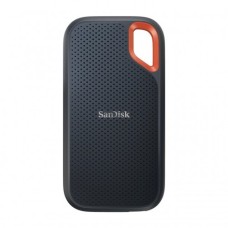
Blazing Fast Portable SSD Price in Bangladesh for Quick Transfers Anywhere
Tired of waiting forever to copy big video files? Need fast storage that fits in your pocket? A portable SSD moves huge files in seconds, not minutes. Here at SpeedTech, we list the latest Portable SSD Price in Bangladesh for every need. We help you pick the right speed, size and brand for your work.
Why a Portable SSD Beats Slow Storage
Old flash drives and portable hard disks feel painfully slow today. Big files take ages to copy. That wastes time every single day.
A portable SSD uses flash memory with no moving parts. It's many times faster than a hard drive. It's also smaller, lighter and tougher.
Here is what you get with a portable SSD:
- Copy a 10GB video in under 10 seconds on fast models.
- Edit 4K footage directly from the drive.
- Carry it safely, with no spinning parts to break.
- Plug into laptops, Macs, phones and consoles.
We see creators and freelancers switch to portable SSDs every week. Most say they'll never go back. The time saved pays for the drive quickly.
Building a full editing workstation? Explore our PC components for content creator build in one place.
Portable SSD Price in Bangladesh by Capacity
Capacity is the first choice you make. More space costs more, but the price per terabyte keeps dropping.
We list every size with the latest price and live stock. Let's match capacity to how you work.
500GB Portable SSD (Light Users)
Need fast storage for documents, slides and photos? A 500GB drive is a simple start. It's perfect for students and office users.
Many buyers check the 500GB portable SSD price in BD for daily file transfers. It's much faster than a pen drive and fits in any pocket.
- Great for class projects and presentations.
- Quick backup for work files.
- Easy to carry between home and office.
1TB Portable SSD (Best All-Rounder)
This is the size most people should buy. It gives plenty of space at a fair cost.
The 1TB portable SSD price offers the best value for most users. Photographers, freelancers and YouTubers love this size. It stores thousands of RAW photos or hours of 4K video.
It's also great for MacBook users who need extra space. Many use it as a fast Time Machine backup drive too.
Editing straight from the drive on a desktop? Add a 32GB desktop RAM kit for video editing for smoother timelines.
2TB and 4TB Portable SSD (Creators and Pros)
Do you shoot 4K or 8K video? Work on big design projects? Then more space pays off.
The 2TB portable SSD price in Bangladesh has dropped a lot recently. It's now the top choice for video editors and content creators.
A 4TB external SSD suits pros who carry entire projects everywhere. Wedding filmmakers and drone pilots often use this size. Some brands now offer 8TB for even bigger archives.
Grading footage needs accurate colors too. See our 4K monitor for photo and video editing range.
USB Speeds Explained: Gen 2, Gen 2x2 and USB4
Speed depends on two things: the SSD and your computer's port. Both must match to get full speed.
Here is what each standard means in real use:
- USB 3.2 Gen 1 (5Gbps): Up to about 450 MB/s. Entry-level speed.
- USB 3.2 Gen 2 (10Gbps): Up to about 1,050 MB/s. The most common today.
- USB 3.2 Gen 2x2 (20Gbps): Up to about 2,000 MB/s. Needs a matching port.
- USB4 / Thunderbolt (40Gbps): Up to 3,800 MB/s and more. For pro Mac and PC users.
Here's the catch. A 2,000 MB/s SSD will only run at about 1,000 MB/s on a Gen 2 port. So check your laptop's USB-C port specs first.
Want full speed on a desktop? Browse our motherboard with USB 3.2 Gen 2x2 port for top transfer rates.
Most Windows laptops and MacBooks support Gen 2 speeds. Gen 2x2 ports are rare, especially on Macs. That makes a Gen 2 USB-C external SSD the smart choice for most buyers.
Not sure what your port supports? Send us your laptop model. We'll tell you which SSD gives full speed.
Top Portable SSD Brands We Stock
A trusted brand gives you real speed, real capacity and a proper warranty. We only stock official portable SSDs from well-known makers.
Samsung: The T7 series is one of the most popular portable SSDs worldwide. Many buyers check the Samsung T7 price in BD first. The T7 Shield adds rugged protection. The Samsung T9 price covers a faster Gen 2x2 model for pros.
SanDisk: The Extreme and Extreme Pro lines are built for creators on the move. The SanDisk Extreme portable SSD price in BD attracts photographers and travelers. Its rugged body and carabiner loop are handy outdoors.
Crucial: Crucial drives offer strong speed at great value. The Crucial X9 Pro price suits buyers who want fast, compact storage. The X10 Pro goes even faster.
Kingston: The XS1000 and XS2000 are tiny and quick. The Kingston XS1000 price in BD makes it a favorite for students and office users.
We also carry Lexar, Transcend, ADATA, WD, Seagate and LaCie. Every drive is official and brand-new, with valid warranty.
Portable SSD for MacBook, iPhone and Android
Portable SSDs work beyond laptops. They connect to phones and tablets too, through USB-C.
MacBook: Many MacBooks come with limited storage. Apple storage upgrades are expensive. A portable SSD for MacBook adds fast space at a much lower cost. Format it as APFS for Mac-only use, or exFAT to share with Windows.
iPhone: iPhone 15 Pro and newer Pro models can record ProRes video straight to an external SSD. A portable SSD for iPhone frees up phone storage for creators. Use a short, good-quality USB-C cable for stable recording.
Android and iPad: Most modern Android phones and USB-C iPads read external SSDs. You can move photos and videos off your device in seconds.
Here are quick tips for mobile use:
- Format the drive as exFAT for the widest support.
- Use the cable that came with the SSD.
- Some phones limit power, so compact SSDs work best.
Portable SSD for PS5, Xbox and Gaming
Game files are huge. Many titles need over 100GB. Console storage fills up fast.
A portable SSD for PS5 stores PS5 games and plays PS4 games directly. Load times for PS4 games are much faster than on an external HDD. Moving PS5 games back to internal storage is quick too.
Xbox Series X|S also plays older Xbox games from external USB storage. An SSD cuts loading screens a lot.
PC gamers can use portable SSDs for their game library. Games load faster than from a hard disk. That's great for laptops with small internal storage.
Fast loading is only half the story. Pair it with a graphics card for smooth PC gaming for high frame rates.
Choose at least 1TB for gaming. 2TB gives room for a large library without constant deleting.
Rugged, Waterproof and Encrypted SSDs
Portable drives go everywhere. They face drops, rain, dust and heat. Some models are built to survive all of it.
A rugged portable SSD has a shock-resistant shell. Many carry IP55 or IP65 ratings for water and dust resistance. Some survive drops of 2 to 3 meters.
Popular rugged options include:
- Samsung T7 Shield.
- SanDisk Extreme and Extreme Pro.
- LaCie Rugged SSD.
- ADATA SD810.
These suit photographers, drone pilots, travelers and field workers. They're also great for rainy season commutes in Bangladesh.
Data security matters too. Many portable SSDs offer 256-bit AES hardware encryption. You can set a password so no one else can read your files. That's great for client projects, office data and personal files.
If the drive gets lost, your data stays locked and safe.
Portable SSD vs Portable HDD
Both drives store files on the go. But they work very differently. The portable SSD vs HDD choice depends on your budget and speed needs.
Speed: SSDs are far faster. Most reach 1,000 to 2,000 MB/s. HDDs give only about 100 to 140 MB/s.
Durability: SSDs have no moving parts. They survive drops and bumps much better. HDDs can fail if dropped while running.
Size and weight: SSDs are pocket-sized and very light. HDDs are bulkier and heavier.
Price per TB: HDDs are cheaper for large storage. SSDs cost more but give far better performance.
Here's our simple advice:
- Pick an SSD for daily work, editing and fast transfers.
- Pick an HDD for cheap, large backups at home.
- Use both for the best mix of speed and space.
Many creators edit on an SSD and archive finished projects on an HDD. It's a smart, budget-friendly workflow.
Faster storage shines with a strong chip. Compare our processor for 4K video editing options for quicker renders.
Heat, Care and Safe Use Tips
Fast SSDs can get warm during long transfers. That's normal. But too much heat can slow them down.
When an SSD gets hot, it lowers its speed to protect itself. This is called thermal throttling. Metal or rubber-coated bodies help spread heat better.
Here's how to keep your SSD healthy:
- Don't cover it with bags or cloth during big transfers.
- Keep it out of direct sunlight and hot cars.
- Always eject safely before unplugging.
- Use a good-quality USB-C cable.
Our hot summers can raise drive temps quickly. Place the SSD on a hard, cool surface when copying large files.
Long renders heat up your whole desktop too. Keep it steady with a CPU cooler for editing workstation builds.
Power cuts can also interrupt transfers. If your laptop is charging during load shedding, let the copy finish on battery. Unplugging mid-transfer can corrupt files.
Avoid Fake Portable SSDs
Fake SSDs are common in online marketplaces. They claim 1TB or 2TB but hold far less. Some even use slow flash chips that fail quickly.
Once full, fake drives overwrite old files silently. You may lose data without knowing until it's too late.
Watch for these red flags:
- A price far below the market rate.
- Unknown brands with huge capacity claims.
- No box, serial number or warranty card.
- Speeds much lower than the label claims.
You can test a new drive with tools like H2testw or CrystalDiskMark. They check real capacity and real speed.
Every portable SSD we sell is official, sealed and brand-new. You get real capacity, real speed and genuine warranty.
How Long Does a Portable SSD Last?
A good portable SSD usually lasts 5 to 10 years with normal use. SSDs wear out based on how much data you write.
This is measured in TBW (terabytes written). Most users never come close to the limit. Even heavy creators get many years of use.
To extend life:
- Leave about 10 percent of space free.
- Avoid extreme heat and humidity.
- Keep firmware updated using brand software.
Many brands offer 3 to 5 years of warranty. That shows strong trust in their drives.
Plugging in your SSD every day? A PC casing with front USB-C port makes quick connections easy.
Where Can I Order Portable SSD at a Discounted Price in BD?
At SpeedTech, we make buying a portable SSD easy. You get the latest price, live in-stock status and honest advice in one place.
Why creators and professionals across Bangladesh trust us:
- 100 percent official and authentic drives.
- Brand warranty with full claim support.
- Fast delivery across Dhaka and all of Bangladesh.
- Free help with port speed checks and formatting.
Browse our full portable SSD range above. Compare speed, capacity and brand. Need help? Our team is one message away.
Frequently Asked Questions
What is the portable SSD price in Bangladesh?
The portable SSD price in Bangladesh depends on capacity, speed and brand. 500GB models cost the least. 2TB and 4TB high-speed drives cost more. Check our page for the latest price.
Where can I buy a portable SSD in Bangladesh?
You can buy a portable SSD from SpeedTech. We sell official Samsung, SanDisk, Crucial and Kingston drives with warranty and deliver across Bangladesh.
What makes a portable SSD ideal for content creators?
A portable SSD moves large 4K and RAW files in seconds. Creators can edit directly from the drive and carry projects safely in a small, tough body.
Samsung T7 vs SanDisk Extreme, which is better?
Both are excellent. Samsung T7 is slim and fast for daily use. SanDisk Extreme is more rugged with IP-rated protection. Choose based on your work style.
Is a portable SSD worth it over an HDD?
Yes, if you value speed and durability. SSDs are up to 10 times faster and handle drops better. HDDs are only better for cheap bulk storage.
Can I use a portable SSD with iPhone?
Yes, iPhone 15 and newer models with USB-C support external SSDs. Pro models can record ProRes video directly to the drive.
Does a portable SSD work with PS5?
Yes, it stores PS5 games and plays PS4 games directly. Loading is much faster than with an external hard drive.
Why is my portable SSD slow?
Your USB port may be limiting speed. Use a USB 3.2 Gen 2 or faster port with the original cable. Heat can also cause slowdowns.
How long does a portable SSD last?
A portable SSD usually lasts 5 to 10 years. Normal users rarely reach its write limit. Cool storage and free space help it last longer.
Do portable SSDs need a power adapter?
No, portable SSDs get power through the USB cable. They're fully plug-and-play on laptops, Macs, phones and consoles.