
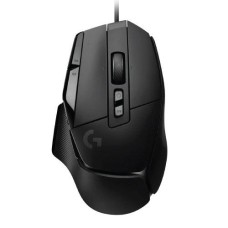
Precise Gaming Mouse Price in Bangladesh for Faster Aim and Smooth Control
Are you missing easy headshots because your mouse feels slow or jumpy? Does your hand get tired after a few matches? The right gaming mouse can fix both. Here at SpeedTech, we list the latest Gaming Mouse Price in Bangladesh for every budget and grip. We help you pick a mouse that tracks perfectly and feels great in your hand.
Why a Gaming Mouse Beats a Regular Mouse
Basic office mice use cheap sensors. They skip, lag and lose tracking during fast moves. That costs you aim in fast games.
A gaming mouse uses a high-quality sensor. It tracks every small movement accurately. Clicks register faster and more reliably.
Here is what a good gaming mouse gives you:
- Accurate, stable tracking with no skipping.
- Faster click and movement response.
- Comfortable shape for long sessions.
- Extra buttons for skills, reloads and shortcuts.
Gaming mice aren't just for games. Designers, editors and office users love the smooth control too. Programmable buttons speed up daily work.
We see gamers and freelancers upgrade every week. Most notice better aim and less hand fatigue right away.
Building a complete gaming PC? Explore our PC components for custom gaming build in one place.
Gaming Mouse Price in Bangladesh by Type
Gaming mice come in a few main types. Each suits different players and setups. The price changes with sensor, weight and connection type.
We list every type with the latest price and live stock. Let's find the one that fits your play style.
Want to see every model at once? Browse our wired and wireless gaming mouse collection with live stock.
Wired Gaming Mouse
Wired mice are simple and reliable. There's no battery to charge and no connection drops. They're also the most affordable option.
A budget gaming mouse in Bangladesh is often wired. Many include RGB lighting, adjustable DPI and side buttons.
- No charging needed.
- Stable, low-latency connection.
- Lower price for students and beginners.
Look for a light, flexible paracord cable. It drags less on the desk and feels almost wireless. A mouse bungee also helps keep the cable out of the way.
A clean desk helps too. A Havit gaming desk with cable management keeps mouse cables tidy and free.
Wireless Gaming Mouse
Wireless mice have come a long way. Modern 2.4GHz wireless is as fast as wired for most gamers. Even esports pros use them now.
The wireless gaming mouse price in BD is higher. But the freedom of no cable is worth it for many players.
Here's what to look for:
- 2.4GHz dongle for gaming, not just Bluetooth.
- Battery life of 70 hours or more.
- USB-C fast charging.
- Tri-mode support for PC, laptop and tablet.
A wireless mouse also keeps your desk clean. It's great for laptops and small setups.
Gaming on the go? Pair your mouse with a gaming laptop in Bangladesh from our range.
Lightweight Esports Mouse
Weight has become a big deal in gaming. Lighter mice move faster and tire your hand less. They're a favorite for FPS games.
A lightweight gaming mouse usually weighs under 70 grams. Some ultralight models weigh under 50 grams. Many use solid thin shells, while some use honeycomb designs.
An esports mouse often combines low weight, a top sensor, high polling rate and smooth PTFE feet. It helps with quick flicks and precise tracking.
Heavier mice still have fans. They feel steady and suit MMO and casual players. Pick the weight that feels right in your hand.
Sensor and DPI Explained Simply
The sensor is the heart of your mouse. It reads your movement and sends it to your PC. A good sensor tracks perfectly with no skipping or jitter.
DPI means dots per inch. It shows how far your cursor moves when you move the mouse. Higher DPI means faster cursor movement.
Here's the truth many sellers skip: very high DPI doesn't make you better. A high DPI gaming mouse with 26,000 DPI sounds impressive. But most pro gamers play between 400 and 1600 DPI.
What matters more:
- Sensor quality: Top sensors like PixArt PAW3395 and Logitech HERO track perfectly.
- No acceleration: The cursor should move the same, whether you move slow or fast.
- Low lift-off distance: The mouse stops tracking quickly when lifted.
Our simple advice: pick a trusted sensor, then set DPI to what feels comfortable. For FPS games, 800 DPI is a great starting point.
Polling Rate and Latency
Polling rate shows how often your mouse reports its position to your PC. It's measured in Hz.
Here's what the numbers mean:
- 125Hz: Reports 125 times per second. Found on basic office mice.
- 1000Hz: Reports every 1 millisecond. The standard for gaming.
- 4000Hz to 8000Hz: Reports up to 8 times faster. Built for esports and high refresh rate monitors.
Higher polling rates make cursor movement smoother, especially on 240Hz or 360Hz monitors. The difference is small but real for competitive players.
Want to see that smoothness? Check our 240Hz gaming monitor for esports range.
There's a catch. Very high polling rates use more CPU power and drain wireless batteries faster. For most gamers, 1000Hz is perfect.
Latency also matters. This is the delay between your click and the action on screen. Good gaming mice use fast optical or mechanical switches with very low click latency.
Wireless mice today have latency close to wired ones. Just use the 2.4GHz dongle, not Bluetooth, for games.
Find Your Grip Style and Size
Comfort depends on how you hold your mouse. There are three main grip styles.
Palm grip: Your whole hand rests on the mouse. It's relaxed and comfortable. Choose a larger, ergonomic mouse with a high back.
Claw grip: Your palm touches the back, and your fingers arch up. It gives fast clicks and good control. Medium-sized mice with a raised back work best.
Fingertip grip: Only your fingertips touch the mouse. It allows quick, small movements. Small and light mice work best.
Hand size matters too. Measure from your wrist to your middle fingertip:
- Under 17cm: Small mouse.
- 17cm to 19cm: Medium mouse.
- Over 19cm: Large mouse.
Also think about shape. Ergonomic mice are shaped for right hands. Ambidextrous mice are symmetrical and suit left-handed users and claw grips.
Not sure what fits you? Visit us or send us your hand size and grip style. We'll suggest the best shape.
Best Mouse by Game Type
Different games need different mice. Here's a simple guide.
FPS games (Valorant, CS2, PUBG PC, Apex): Choose a light mouse with a top sensor and smooth feet. A gaming mouse for Valorant should weigh 50 to 70 grams. Fewer buttons keep weight low.
Hearing footsteps matters as much as aim. A gaming headphone for FPS games gives you clear directional sound.
MOBA games (Dota 2, League of Legends): Pick a comfortable, medium-weight mouse. Fast, reliable clicks matter most. A few side buttons help with items and skills.
MMO games (World of Warcraft, Lost Ark): An MMO mouse with side buttons gives you 12 or more programmable keys. You can map spells and abilities under your thumb.
Casual and mixed gaming: A balanced mouse with RGB, 5 to 7 buttons and a comfy shape works great.
Complete your controls with a mechanical gaming keyboard with RGB that matches your mouse.
Playing on a laptop? A compact gaming mouse for laptop use is light and easy to carry. Wireless models keep your bag tidy.
Top Gaming Mouse Brands We Stock
A trusted brand gives better sensors, stronger switches and real warranty. We only stock official mice from known makers.
Logitech G: Known for HERO sensors and LIGHTSPEED wireless. The Logitech G mouse price in BD covers budget to pro-level models.
Razer: Famous for Focus Pro sensors and fast optical switches. The Razer mouse price in Bangladesh attracts esports fans and serious gamers.
Fantech: Offers great value with good sensors and RGB. The Fantech mouse price suits students and new gamers.
Havit: Makes affordable, reliable mice with solid features. The Havit gaming mouse price in BD is great for budget setups.
A4Tech Bloody: Known for macro features and durable builds. The A4Tech Bloody mouse price is popular with long-time gamers.
We also carry Redragon, Rapoo, Corsair, SteelSeries, HyperX, Asus ROG, Zowie, Glorious, Attack Shark, VXE and more. Every mouse is official and authentic, with valid warranty.
Add rich sound to your setup with RGB computer speakers for gaming from trusted brands.
Switches, Feet and Build Quality
Small parts make a big difference in how a mouse feels and lasts.
Switches: These sit under the main buttons. Mechanical switches from Omron, Kailh or Huano give crisp clicks. Optical switches use light, so they respond faster and don't double-click over time. Many are rated for 50 to 100 million clicks.
Mouse feet: PTFE feet glide smoothly across the pad. Some mice use pure white PTFE for even less friction. Worn feet can be replaced to restore glide.
Scroll wheel: A good wheel has clear steps and no wobble. Some mice offer tilt or infinite scroll.
Coating: Matte or textured coatings improve grip. Some mice include grip tape for sweaty hands.
Cable: A soft paracord cable feels almost weightless. Stiff rubber cables drag and slow you down.
Care, Sweat and Humidity Tips
Our weather is hot and humid for much of the year. Hands sweat more during long matches. That affects grip, coating and even the switches over time.
Here's how to keep your mouse clean and working well:
- Wipe it often: Use a soft cloth with a little isopropyl alcohol.
- Clean the feet: Remove dust and hair stuck to the PTFE feet.
- Clean the sensor: Gently blow dust out of the sensor opening.
- Use grip tape: It helps if your hands sweat a lot.
Never spray liquid directly on the mouse. Moisture can get inside the switches and cause double-click problems.
For wireless mice, store the dongle safely in the mouse slot. Keep the battery healthy by not letting it drain to zero often.
Store your mouse in a dry place. Avoid leaving it near open windows during the rainy season.
Keep your desk tidy and free for mouse movement. An RGB headphone stand with USB hub holds your headset out of the way.
RGB Lighting and Software
Many gamers love lighting that matches their setup. An RGB gaming mouse adds color zones on the logo, scroll wheel or sides.
The RGB gaming mouse price is only a little higher than plain models. Most brands let you sync lighting with your keyboard, headset and PC.
Brand software also lets you:
- Set DPI levels and switch between them.
- Program side buttons and macros.
- Adjust polling rate and lift-off distance.
- Save profiles to onboard memory.
Onboard memory is useful for tournaments and LAN events. Your settings go with the mouse to any PC, with no software needed.
Wireless users can turn RGB off to save battery. Lighting drains power faster than anything else.
Streaming your matches? Add a USB microphone for game streaming for clear voice.
Pair Your Mouse with the Right Pad
Your mouse pad matters almost as much as your mouse. The surface changes speed, control and sensor accuracy.
Control pads: Rough surface slows the mouse for precise aim. Great for tactical FPS games.
Speed pads: Smooth surface lets the mouse glide fast. Great for fast tracking games.
Hybrid pads: Balance speed and control. Good for most players.
A gaming mouse and mouse pad combo saves money and gives a matching look. Extended desk mats also protect your desk and give space for your keyboard.
Low-sensitivity FPS players need a large pad, around 45cm wide or more. That gives space for big arm swipes.
Find your perfect surface in our extended RGB gaming mouse pad range.
How Long Does a Gaming Mouse Last?
A good gaming mouse usually lasts 3 to 5 years with daily use. Premium models can last even longer.
Life span depends on:
- Switches: Optical switches avoid double-click problems.
- Care: Cleaning keeps the sensor and feet in good shape.
- Battery: Wireless batteries slowly lose capacity over the years.
Common signs of wear include double-clicking, a skipping sensor or worn feet. Feet are easy to replace. Switch problems are often covered by warranty.
Warranty and Authentic Products
Copy gaming mice are common in online marketplaces. They look like brand models but use cheap sensors and weak switches. Many start double-clicking within months.
Every gaming mouse we sell is official and brand-new. It comes with valid brand warranty, often 1 to 2 years.
What you get from us:
- Sealed retail boxes with all accessories.
- Genuine sensors and switches as listed.
- Brand warranty with full claim support.
If your mouse faces a problem, we help with the claim. You don't have to handle it alone.
Finish your battle station with our gaming accessories in Bangladesh for every corner of your desk.
Where to Buy Gaming Mouse Online in BD?
At SpeedTech, we make buying a gaming mouse easy. You get the latest price, live in-stock status and honest advice in one place.
Why gamers across Bangladesh trust us:
- 100 percent official and authentic mice.
- Brand warranty with claim support.
- Fast delivery across Dhaka and all of Bangladesh.
- Free advice on grip, weight and sensor.
Browse our full gaming mouse range above. Compare weight, sensor and brand. Need help? Our team is one message away.
Frequently Asked Questions
What is the gaming mouse price in Bangladesh?
The gaming mouse price in Bangladesh depends on sensor, connection and brand. Wired budget mice cost the least. Lightweight wireless esports mice cost more. Check our page for the latest price.
Where can I buy a gaming mouse in Bangladesh?
You can buy a gaming mouse from SpeedTech. We sell official Logitech G, Razer, Fantech, Havit and A4Tech Bloody mice with warranty and deliver across Bangladesh.
What makes a lightweight mouse ideal for FPS gamers?
A lightweight mouse moves faster and tires your hand less. It helps with quick flicks and precise aim in games like Valorant and CS2.
Is higher DPI better for gaming?
No, higher DPI isn't always better. Sensor quality matters more. Most pro players use 400 to 1600 DPI for better control.
Wired vs wireless gaming mouse, which is better?
Modern 2.4GHz wireless mice are as fast as wired ones. Wired mice need no charging and cost less. Choose based on budget and desk setup.
What is polling rate in a gaming mouse?
Polling rate shows how often the mouse reports to your PC. 1000Hz is the gaming standard. Higher rates give smoother tracking on fast monitors.
What mouse weight is best for FPS?
For FPS games, 50 to 70 grams works well. Lighter mice help with fast flicks. Heavier mice feel steadier for some players.
Which grip style do I use?
If your whole hand rests on the mouse, it's palm grip. If your fingers arch, it's claw. If only fingertips touch, it's fingertip grip.
Is a gaming mouse good for office work?
Yes, a gaming mouse gives smooth tracking and extra buttons. Programmable keys speed up editing, design and daily office tasks.
How long does a gaming mouse last?
A good gaming mouse lasts 3 to 5 years. Optical switches and regular cleaning help it last longer.